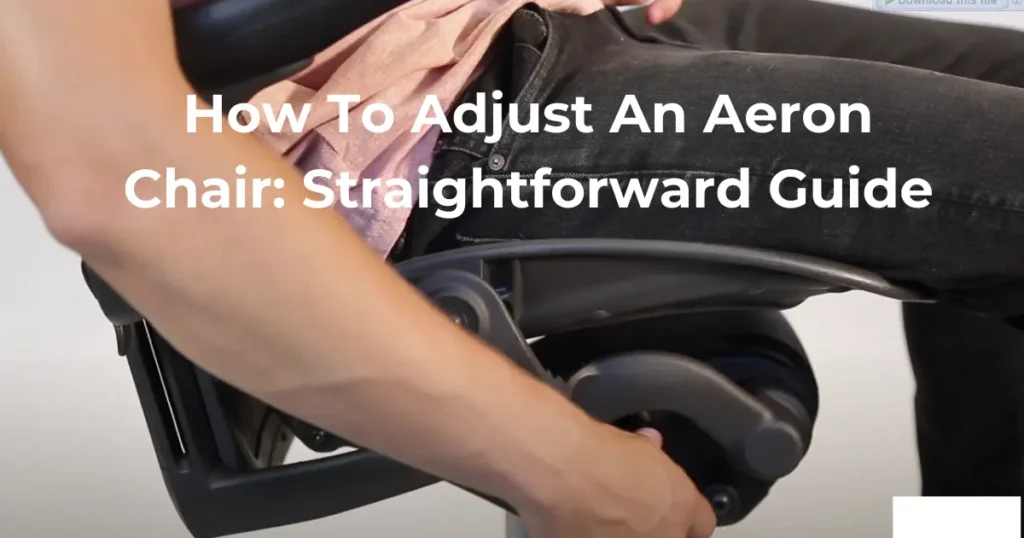
Learning how to adjust the Aeron chair by Herman Miller properly is essential to ensure maximum comfort and ergonomic support. Follow these steps to customize your chair settings:
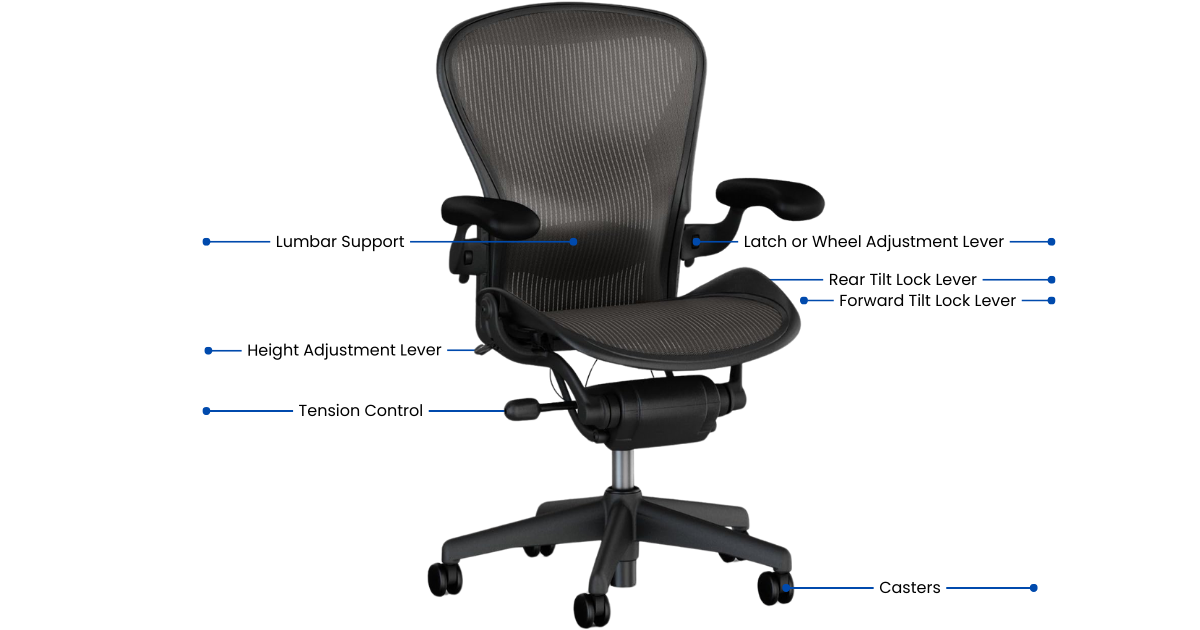
Height Adjustment: How To Adjust An Aeron Chair by Herman Miller
The height adjustment is found on the right-hand side of the chair. To set the height:
- Sit upright in the chair.
- Locate the lever on the right-hand side.
- Raise the lever to change the chair’s height.
- After you have set it to your desired height, release the lever.
Rear Tilt Lock
The rear tilt lock allows you to control the reclining function of the chair. To use it:
- Sit upright and lift the lever to engage the rear tilt lock.
- Push the lever down to allow the chair to recline again.
Forward Tilt
The forward tilt feature provides additional forward support. To activate it:
- Recline in the chair and lift the forward lever.
- Come as far forward as you can in the chair.
- Lift the back lever to engage the forward tilt, resulting in a 5-10% forward tilt in your chair.
- To disengage the forward tilt, simply push both levers down; afterward, you’ll be able to recline freely.
Recline Tension: How To Adjust An Aeron Chair by Herman Miller
The tension bar on the right-hand side adjusts how freely you can recline in the chair. To adjust it:
- Locate the tension bar on the right-hand side.
- First, spin the tension bar, then continue until you have reached your desired tension.
Armrest Height Adjustment: How To Adjust An Aeron Chair by Herman Miller
To adjust the armrest height:
- Release the lever found on the armrest.
- Use the latch or wheel mechanism to set the armrest to your preferred height.
Lumbar Pad Adjustment: How To Adjust An Aeron Chair by Herman Miller
For additional back support, the lumbar pad can be adjusted to your preference:
Position the lumbar pad to your desired height and firmness for optimal lower back support.
Feeling off-balance even after adjusting your Aeron chair? See how to replace casters on an Aeron chair and get back to effortless movement
Tips for Optimal Ergonomics
Monitor height: Your monitor should be at eye level, about arm’s length away, to reduce neck strain.
Keyboard and mouse position: Keep them within easy reach to prevent overextending your arms.
Footrest: For added support, consider using a footrest, especially if your feet do not comfortably touch the floor.
For a visual demonstration of these adjustment steps, check out this helpful YouTube video link below that guides you through customizing your Aeron chair to achieve maximum ergonomic comfort. Watching the adjustments in action can make it easier to fine-tune each setting to suit your body’s needs and workspace.
Ready to Upgrade Your Seating Comfort?
Now that you know how to adjust an Aeron chair, upgrade your workspace with a fully loaded refurbished Herman Miller Aeron Size B, professionally restored and backed by a lifetime mechanical warranty.

Customize Your Comfort with the Aeron Chair by Herman Miller
Experience tailored ergonomic support with refurbished office chairs like the used Aeron chair by Herman Miller. From height and tilt adjustments to lumbar support and armrest settings, learn how to fine-tune each feature to suit your unique needs. Discover how the right adjustments on a refurbished office chair can elevate your comfort, enhance productivity, and help you maintain optimal posture throughout your day.
Want to keep your Aeron chair performing like new? Learn how to spot early wear and handle Herman Miller chair repairs before comfort and ergonomics are affected.
Conclusion
By correctly adjusting your Aeron chair, you can not only improve your posture but also reduce discomfort; as a result, your overall productivity will be enhanced. Review and readjust your settings to maintain optimal ergonomics as your tasks or body needs change.
For more detailed instructions and visual aids, refer to Herman Miller’s official guide or the user manual specific to your Aeron chair model.
Frequently Asked Questions (FAQ)
How do I know if my chair height is correct?
Your knees should form a right angle of 90 degrees.
What should I do if the tilt lock doesn’t engage?
Ensure you are sitting upright and fully lifting the lever. If the issue persists, check the Herman Miller tilt lock mechanism for obstructions or consult the user manual.
How often should I adjust the recline tension?
Adjust the recline tension based on your comfort and your tasks. You may need to change it if you switch between tasks requiring different support levels.
Can the lumbar pad be removed?
The lumbar pad is designed to be adjustable and can also be removed if it does not suit your needs. Nevertheless, using the lumbar support is recommended for optimal back comfort.
What is the best position for the armrests?
To ensure proper posture, the armrests should be adjusted so that your elbows are at a 90-degree angle, allowing your shoulders to remain relaxed. Adjust them frequently to match your tasks and seating posture.