Why Chair Comfort Matters for Health and Productivity
I’ve pulled apart thousands of office chairs over the years, and the one thing that never changes is how much a bad seat quietly costs people. Not just in back pain or stiffness, though those are real enough. The hidden cost is attention. When you’re shifting around every ten minutes trying to find a position that doesn’t ache, you’re not thinking about your work. You’re managing discomfort.
Poor seating posture puts sustained pressure on the lumbar discs, compresses circulation in the legs, and forces the neck and shoulders into compensating positions that create downstream problems. Over time, these small daily stresses compound into chronic issues that are much harder to undo than prevent.
The good news is that you don’t always need a new chair to make a meaningful improvement. A combination of targeted add-ons and proper adjustments can transform an uncomfortable chair into something genuinely workable. This guide walks through ten practical tips I’d give anyone struggling with their current setup.
Signs Your Chair Isn’t Comfortable
Before spending money or time on fixes, it helps to identify what you’re actually dealing with and the underlying cause of back pain. Persistent lower back pain by mid-afternoon is usually the first signal. Numbness or tingling in the thighs points to seat pan pressure cutting off circulation. Constant fidgeting tells me the chair isn’t distributing weight correctly. Slouching forward without realizing it generally means lumbar support is missing or in the wrong position. Shoulder and neck tension by end of day often traces back to armrests set at the wrong height.
If you recognize two or more of these, your chair needs attention. Whether it needs a full replacement or targeted adjustments depends on what you find working through the tips below.
Tips to Make a Chair More Comfortable
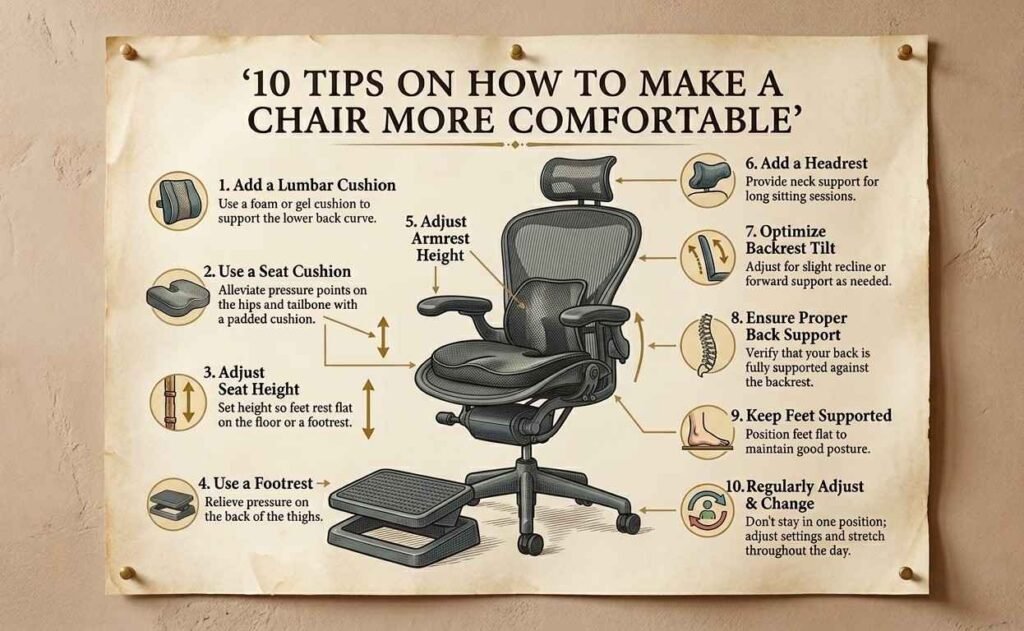
1. Add a Seat Cushion or Memory Foam Pad
The fastest upgrade for an uncomfortable chair is a quality seat cushion. Hard or worn-out seat padding creates direct pressure on the sit bones, reducing circulation and causing the numbness many people associate with long hours at a desk.
Memory foam cushions contour to your body and distribute weight more evenly than flat pads. Gel-infused options add a cooling layer that helps with heat buildup during long hours of sitting. Coccyx cutout designs relieve tailbone pressure specifically, which is worth considering if you experience pain in that area. Aim for a thickness of 2 to 3 inches for meaningful pressure relief without raising your seat height so much that it disrupts your ergonomic setup.
2. Use Lumbar Support
The curve of your lower back needs something to rest against. Without it, the muscles along the lumbar spine work overtime just to keep you upright, and that sustained effort is exactly what causes the dull ache that builds through the afternoon. According to the American Chiropractic Association, back pain is one of the leading causes of missed work, and poor seated posture is a primary contributor.
If your chair lacks a built-in adjustment, a separate lumbar cushion placed at the small of your back does the same job. Position it so it contacts your spine at roughly belt-line height. The goal is to maintain the natural inward curve of your lower back without forcing an exaggerated arch. For chairs that do have an adjustable lumbar feature, take five minutes to actually use it. Most people spend months on their ergonomic chair without ever touching the lumbar knob.
3. Adjust Chair Height Properly
Seat height is foundational. Get this wrong and almost every other adjustment becomes less effective, because good posture starts from where your feet meet the floor.
The target: feet flat on the floor, knees bent at roughly 90 degrees, thighs parallel to the ground or with a very slight downward angle. Your eyes should be level with the top third of your monitor when sitting upright, and your elbows should rest comfortably at desk height without your shoulders shrugging. Most people set their chair height once and never revisit it. If you’ve changed desks, added a monitor riser, or switched workspaces, it’s worth rechecking. The adjustment takes thirty seconds.
4. Improve Armrest Positioning
Armrests in the wrong position are a consistently overlooked source of shoulder and neck tension. Too high and your shoulders ride up toward your ears all day, creating upper trapezius strain. Too low and your arms hang unsupported, pulling weight through the shoulder joints continuously.
The ideal position puts your elbows at roughly 90 to 100 degrees with your shoulders relaxed and down. Your forearms should rest lightly, not bear your full arm weight. For chairs with fixed armrests that are significantly misaligned, foam armrest pads at least reduce the hardness of contact, even if they can’t correct the geometry.
5. Add a Footrest
If your desk chair height doesn’t allow your feet to rest flat on the floor, a footrest addresses a real circulation issue, not just comfort preference. Legs that dangle or press against the seat edge without floor contact restrict blood flow through the thighs and contribute to leg fatigue during long work sessions.
A proper footrest supports the feet at a slight angle with knees at or close to 90 degrees. Adjustable footrests that allow changes in both height and tilt work best because they accommodate different positions throughout the day. Even a sturdy box works as a short-term solution while you source a proper one.
6. Upgrade Chair Wheels or Base
Unstable or worn wheels force constant micro-corrections in your posture that add up across a full day. If your chair rolls away unexpectedly or catches on carpet and jerks, your core and leg muscles are quietly working to stabilize you the entire time.
Replacing worn casters with quality polyurethane wheels improves rolling consistency on both hard floors and carpet. The chair moves when you intend it to and holds position when you don’t. A structurally unstable base that wobbles due to cracked components is also a safety concern worth addressing before it becomes a bigger problem.
7. Use Breathable Covers or Materials
Heat and moisture buildup is a genuine comfort problem for long hours of sitting, especially on chairs with vinyl, faux leather, or dense foam upholstery. These materials don’t breathe, so body heat accumulates and discomfort builds gradually through the session.
Breathable mesh covers or seat covers made from natural fibers allow airflow that synthetics block. For chairs where the original upholstery is worn or cracked, a fitted seat cover can restore a clean surface and add some padding without replacing the whole chair. In warmer seasons or climates, this is one of the more impactful comfort upgrades for sustained sitting.
8. Fix or Tighten Loose Chair Parts
A chair that wobbles, squeaks, or shifts unexpectedly is more than annoying. Every instability triggers a postural compensation response, and those small compensations accumulate into real fatigue over a long work day.
Check the screws and bolts on armrests, seat pan brackets, and the backrest mechanism. Many chairs develop looseness simply from daily use, and tightening them takes five minutes. If the seat slowly sinks due to a failing gas cylinder, that’s worth addressing too, since sitting too low throws off the entire ergonomic chain. For significant mechanical failures on higher-quality chairs, a professional repair service often makes more sense than replacement when the frame itself is still sound.
9. Recline and Tilt Adjustments
Staying fully upright all day is not the ergonomic ideal most people assume it is. A slight recline actually reduces pressure on the lumbar discs compared to a vertical seated posture, and varying your recline angle throughout the day gives different muscle groups rest in rotation.
Most office chairs have a tilt tension adjustment controlling backrest resistance when you lean back. Set it so leaning back requires a small amount of deliberate effort. If your chair has a tilt lock, use it during focused forward-facing work and release it when you’re reading, thinking, or on a call. Moving between positions intentionally puts less sustained load on any single set of tissues than holding one posture rigidly for hours.
10. Improve Desk Setup Alongside Chair
Chair adjustments only go so far if your desk setup is working against them. The two have to be calibrated together.
Monitor height is the most commonly neglected element. The top of your screen should be at or slightly below eye level when sitting upright. A screen that’s too low pulls the head forward and strains the cervical spine; one that’s too high compresses the back of the neck. OSHA’s computer workstation ergonomics guidelines recommend monitor placement that minimizes neck flexion and eye strain, and a monitor riser or adjustable arm achieves this without replacing existing equipment.
Keyboard and mouse placement should allow elbows to stay at roughly 90 degrees with wrists in a neutral position. A keyboard tray positioned slightly below desk surface height often achieves this better than placing everything flat on the desk. If you have access to a standing desk, alternating between sitting and standing throughout the day is the most effective way to reduce cumulative sitting load regardless of chair quality.
Common Mistakes to Avoid
The tips above work best when you also sidestep the habits that undermine them. Sitting for more than 60 to 90 minutes without moving is the most common. No chair fully compensates for static loading over long periods. Set a timer and stand, walk, or stretch at regular intervals.
Ignoring posture drift is the second major pattern. Most people sit well for the first twenty minutes after adjusting their setup and then gradually slide back into familiar habits. Brief posture check-ins throughout the day are more effective than any single ergonomic purchase.
Finally, using a non-adjustable chair as your primary seat for long work sessions accumulates cost over time in discomfort and physical strain. If your work from home or office setup involves more than a few hours of seated work daily, the chair needs to be adjustable enough to fit your body. No add-on fully compensates for a chair that’s fundamentally the wrong size or shape.
Final Thoughts: Comfort Is an Investment
Every tip in this list costs less than the chronic discomfort of ignoring the problem. Some cost almost nothing. A lumbar cushion, a properly calibrated seat height, a footrest: these changes compound into meaningful improvement over the course of a week, a month, or a year of daily use.
I’ve watched people spend years assuming their back pain was inevitable, then make three targeted adjustments to their chair and desk and notice a difference within days. The chair you’re using right now may be much more fixable than it seems. Work through this list systematically before deciding whether replacement is necessary.
Ergonomics is not about perfection. It’s about reducing unnecessary load on your body so your work doesn’t cost you physically. That’s an investment worth making.
Frequently Asked Questions
Upgrade your comfort for the long term.
Explore sustainable seating solutions trusted across the U.S. and transform your workspace today.