Introduction
I’ve spent my entire working life in a workshop surrounded by ergonomic office chairs, and if there’s one thing that years of this work has made plain, it’s that most people set up their home offices by accident. They use whatever desk fits the corner of the room and whatever chair they have lying around and then wonder why their back hurts by mid-afternoon.
Working from home has given millions of people more control over their workspace than they’ve ever had in a traditional office. That’s a real opportunity. But it only pays off if you make intentional choices about the furniture you’re working with every day. Poor setups lead to back pain, neck strain, and the kind of slow fatigue that chips away at your focus long before you notice the cause.
This guide walks through how to choose ergonomic furniture for a home office the right way, starting with the piece that matters most and building outward from there.
Why Ergonomic Furniture Matters for a Home Office
Ergonomic furniture is furniture designed to fit the way your body actually works, rather than furniture your body has to adapt to. That distinction matters a great deal over the course of a full workday, and even more over the course of months and years.
The data on this is consistent. According to the Bureau of Labor Statistics, musculoskeletal disorders account for a significant share of workplace injury cases involving days away from work, and sedentary desk work is a well-documented contributor. The difference between an ergonomic workspace and a poorly designed one isn’t just comfort in the moment. It’s whether your body is accumulating strain over time or not.
Health Benefits of Ergonomic Furniture
A properly set up ergonomic workspace addresses the body’s needs across several dimensions at once. The chair supports your spine in its natural curve so the muscles along your back aren’t working overtime just to keep you upright. The desk height keeps your arms in a neutral position so your shoulders don’t creep upward over the course of the afternoon. The monitor position keeps your neck from flexing forward for hours at a stretch.
Together, these adjustments reduce the cumulative strain that shows up as lower back pain, shoulder tension, wrist discomfort, and headaches. None of those symptoms appear because of one bad hour at a desk. They appear because of hundreds of hours of suboptimal positioning, slowly adding up.
- Reduced back pain: Proper lumbar support keeps the spine’s natural lordotic curve intact while seated, reducing disc compression and muscle fatigue.
- Improved posture: Ergonomic furniture guides the body into better alignment naturally, rather than relying on the user to maintain posture through active effort.
- Reduced fatigue: When the body is properly supported, less energy is spent compensating for poor positioning, which means more energy available for actual work.
- Injury prevention: Repetitive strain injuries from sustained awkward positions are among the most preventable workplace injuries. Ergonomic furniture is the primary prevention tool.
Productivity Improvements from a Proper Workspace Setup
Comfort and focus are more connected than most people realize. When you’re not shifting in your seat trying to find a position that doesn’t ache, when you’re not tilting your monitor because the glare is hitting it wrong, and when your wrists aren’t straining to reach a keyboard at the wrong height, your attention stays where you want it. Keeping the surrounding workspace organized matters too, and having modular storage cabinets and shelves can help keep documents, equipment, and other work essentials off the main work surface. The physical environment stops competing for mental bandwidth.
I’ve had clients tell me their afternoon productivity improved noticeably after switching to a properly set up ergonomic workstation. That’s not surprising. Discomfort is a persistent, low-level distraction, and eliminating it frees up more cognitive capacity than most people expect.
Key Types of Ergonomic Furniture for a Home Office
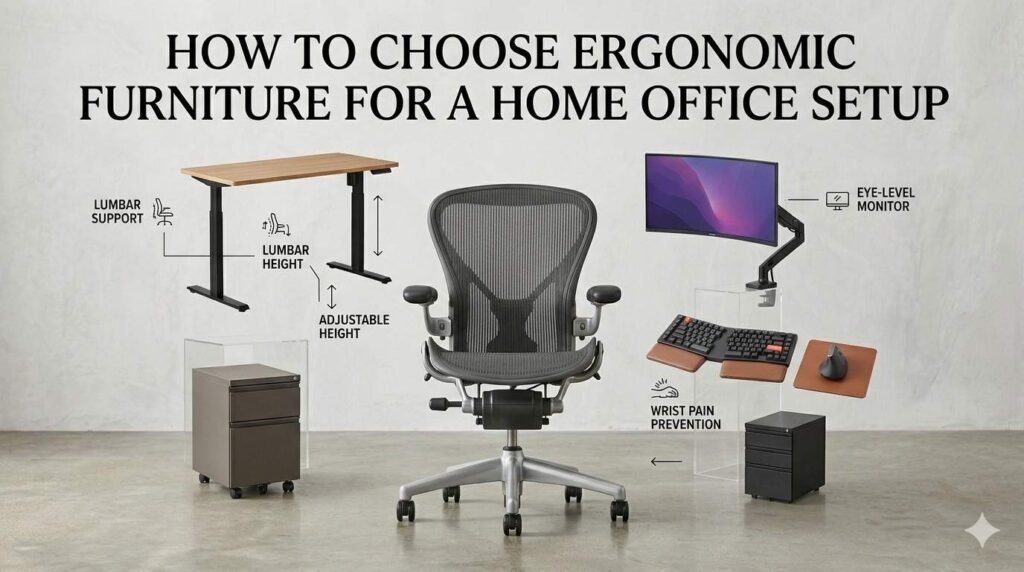
A complete ergonomic home office setup involves three categories: the chair, the desk, and the accessories that bring everything else into alignment. Each plays a distinct role, but the chair is where I always start with clients because it’s the foundation everything else is built on.
Ergonomic Office Chairs
Your chair determines how your hips sit, which determines where your elbows naturally fall, which determines where your keyboard needs to be, which determines what angle your neck holds when you look at your monitor. The chair is not one piece of ergonomic furniture among equals. It’s the piece that sets the parameters for all the others.
A genuinely ergonomic office chair needs adjustable lumbar support to maintain spinal alignment; seat height and depth adjustment to fit your leg length properly; breathable mesh or material to prevent heat buildup during long sessions; 4-way adjustable armrests to keep your shoulders neutral; and a tilt mechanism that supports natural movement rather than locking you rigid.
The Herman Miller Aeron, in both its Classic and Remastered forms, is the benchmark most serious ergonomic chair discussions eventually come back to. The Classic Aeron has been in production since 1994 and remains one of the most well-engineered chairs available. The Remastered, launched in 2017, refined the lumbar system to the PostureFit SL mechanism, updated the mesh tension zones, and added a forward tilt option. Both are excellent chairs for home office use, and both are widely available through the refurbished market at 40 to 60 percent off new pricing.
Adjustable Desks (Standing or Sit-Stand)
A fixed-height desk is a compromise. It’s set at a height that works reasonably well for an average body in a seated position, which means it works suboptimally for most actual people. Adjustable desks fix that problem by letting the work surface meet the user rather than the other way around.
Sit-stand desks go a step further, allowing you to alternate between seated and standing positions throughout the workday. Standing breaks reduce the postural load of continuous sitting, improve circulation in the lower body, and help with that mid-afternoon energy dip that’s so common in sedentary work environments. The key is that standing desks supplement good seated ergonomics rather than replace them. You still need a good ergonomic chair, because most people still spend the majority of their workday seated even with a sit-stand desk available.
For a home office, a height-adjustable desk with a solid, spacious work surface gives you the flexibility to accommodate different tasks and different body positions throughout the day. A minimum depth of 24 inches and width of 48 inches are reasonable starting points for a single-monitor setup.
Ergonomic Accessories
Accessories address the gaps that a chair and desk alone can’t fully close. The most impactful ones are the following:
- Monitor arm: Lets you position your screen at exact eye level and at the right distance (20 to 30 inches), regardless of your desk or monitor base. Far more adjustable than a fixed stand.
- Keyboard tray: Positions the keyboard below desk surface level, which is often the correct height for neutral wrist and forearm positioning, particularly on higher desks.
- Footrest: Essential for shorter users whose feet don’t reach the floor comfortably when the chair is set to the right seat height. Keeping feet flat and supported reduces pressure on the back of the thighs.
- Laptop stand: If you work on a laptop, a stand raises the screen to eye level. You’ll need an external keyboard and mouse to use it properly, but the postural improvement is significant.
- Wrist support: A padded wrist rest in front of the keyboard helps maintain neutral wrist position during typing, reducing cumulative strain on the tendons and carpal tunnel.
- Ergonomic lighting: Proper task lighting that illuminates the work surface without creating screen glare reduces eye strain across long sessions. Position lights to the side rather than behind or above the monitor.
Ergonomic Chair Comparison: Classic Aeron vs Remastered Aeron vs Budget
| Feature | Classic Aeron | Remastered Aeron | Typical Budget Chair |
|---|---|---|---|
| Lumbar Support | Adjustable lumbar pad | PostureFit SL (sacral + lumbar) | Fixed foam or none |
| Seat Depth | Adjustable | Adjustable (refined) | Fixed |
| Breathable Mesh | 8Z Pellicle | 8Z Pellicle (updated zones) | Thin fabric or foam |
| Armrests | 4-way adjustable | 4-way (refined) | 1- to 2-way at best |
| Tilt / Recline | Tilt limiter + tension | Forward tilt + smooth recline | Basic or none |
| Lifespan | 15 to 20+ years | 15 to 20+ years | 3 to 5 years |
| Refurbished Price | $400 to $700 | $600 to $900 | Not worth refurbishing |
How to Choose the Right Ergonomic Office Chair
Lumbar Support and Back Design: Without proper support, your lower spine rounds outward, compressing discs and causing that familiar deep ache. The Classic Aeron has an adjustable lumbar pad. The Remastered goes further with PostureFit SL, supporting both the sacrum and lumbar regions independently. For anyone sitting six-plus hours daily, that difference is worth knowing.
Seat Height and Depth: You want a 90 to 100 degree knee angle, feet flat, with a couple fingers of clearance between the seat edge and the back of your knees. Both Aeron versions handle this well across a wide range of body types.
Breathable Materials: Foam compresses and traps heat over time. The Aeron’s 8Z Pellicle mesh holds its support and keeps you cooler through long sessions. The Remastered refined the tension mapping for better weight distribution.
Armrests and Tilt: Both versions have 4-way arm adjustment. The Remastered adds a forward tilt that reduces thigh compression during long typing sessions.
How to Choose an Ergonomic Desk
Desk Height: Set your chair first, then adjust desk height so your forearms rest parallel to the floor. For most people that lands around 28 to 30 inches.
Sit-Stand Desks: Prolonged sitting adds up. A sit-stand desk makes it easier to break things up throughout the day. Get the chair sorted first, then consider the desk.
Workspace Size: Monitor at 20 to 30 inches from your eyes and keyboard within natural reach. Handle cable management at setup.
Pro Tip: If your home office is part of an open-plan living area, coordinate your ergonomic desk with any existing or planned table top. Complementary colours, patterns, or finishes can create a more cohesive space without requiring the same material for the desk.
Ergonomic Setup Tips
Monitor Placement: Top of screen at or just below eye level, 20 to 30 inches out. A monitor arm gives you the most flexibility. With two monitors, center the one you use most.
Posture: The chair does the mechanical work, but you still have to sit into it. Feet flat, knees bent, shoulders relaxed, wrists neutral. Get up or shift positions every 45 to 60 minutes.
Lighting: Keep windows to the side of your screen. Add a task light. Warm-toned light around 2700 to 3000K is easier on your eyes than overhead fluorescents.
Why Buy Refurbished
Save 40 to 70 Percent: A new Remastered Aeron runs $1,400 to $1,900. Refurbished ones run $600 to $900. The Classic comes in at $400 to $700. Done properly, you won’t notice a difference in how it performs.
Better for the Environment: Refurbishing extends the life of a chair without the manufacturing overhead of building a new one.
Premium Ergonomics at a Real Price: A refurbished Aeron at $500 outperforms a new budget chair at $300 and will outlast it too. For businesses equipping remote teams, the savings add up quickly.
Where to Buy Ergonomic Office Chairs
The refurbished chair market ranges from specialists who take the work seriously to resellers who clean a chair and call it refurbished. Knowing the difference is worth your time before you buy.
At Nulife Chairs, we specialize in Herman Miller Aeron chairs. Every chair we sell has gone through a documented inspection and refurbishment process: cylinders, arm pads, and casters are checked and replaced where needed; mesh is evaluated; the tilt mechanism is tested through its full range of motion; and the chair is cleaned, sanitized, and function-tested before it ships. We also offer parts and repair services for chairs already in use, because extending the life of a well-built chair is always the right outcome.
We work with remote workers equipping home offices, businesses outfitting teams, and organizations looking to replace aging office furniture without the cost of buying new. If you’re not sure which chair is right for your setup or your budget, that’s a conversation worth having before you buy.
Conclusion
Choosing ergonomic furniture for a home office is less complicated than it might seem if you work through it in the right order. Start with the chair, because everything else in the setup adjusts relative to how the chair positions your body. Choose a desk height and surface size that gives your arms room to work in a neutral position. Add the accessories that close the remaining gaps: monitor arm, footrest, keyboard tray, and task lighting.
The Herman Miller Aeron, in either its Classic or Remastered form, is the chair I’d recommend to almost any home office worker. The Classic delivers strong ergonomic performance at a lower refurbished price point. The Remastered adds the PostureFit SL system and forward tilt for people who need the most advanced spinal support available. Both last decades when properly maintained, and both are available through the refurbished market at 40 to 60 percent of new prices.
Investing in ergonomic furniture is an investment in how you feel at the end of the workday and how you feel at the end of the year. The body keeps track of all those hours at the desk. Give it furniture that’s actually on its side.
Frequently Asked Questions
Upgrading your home office? Start with the most important piece: your chair.
Contact us today to improve your home office ergonomics.