Introduction
I’ve spent my entire working life inside a workshop surrounded by Herman Miller Aeron chairs, taking them apart, rebuilding them, and sending them back out into offices and home setups around the country. In all that time, one thing has become crystal clear to me: most people vastly underestimate how much their chair affects everything else about their workstation.
The average office worker sits for six to eight hours every single day. That’s a long time to be in one position, and if your chair isn’t doing its job (supporting your spine, keeping your hips level, allowing your arms to sit at the right angle), your body is absorbing the cost of that slowly and often painfully. Lower back problems, neck strain, numb legs, and shoulder tension are not just discomforts. They compound over months and years.
The good news is that a genuinely ergonomic setup doesn’t require spending a fortune. It requires making one very intentional decision about your chair and then building everything else around it properly. That’s what this guide is about.
What Is an Ergonomic Workstation Setup?
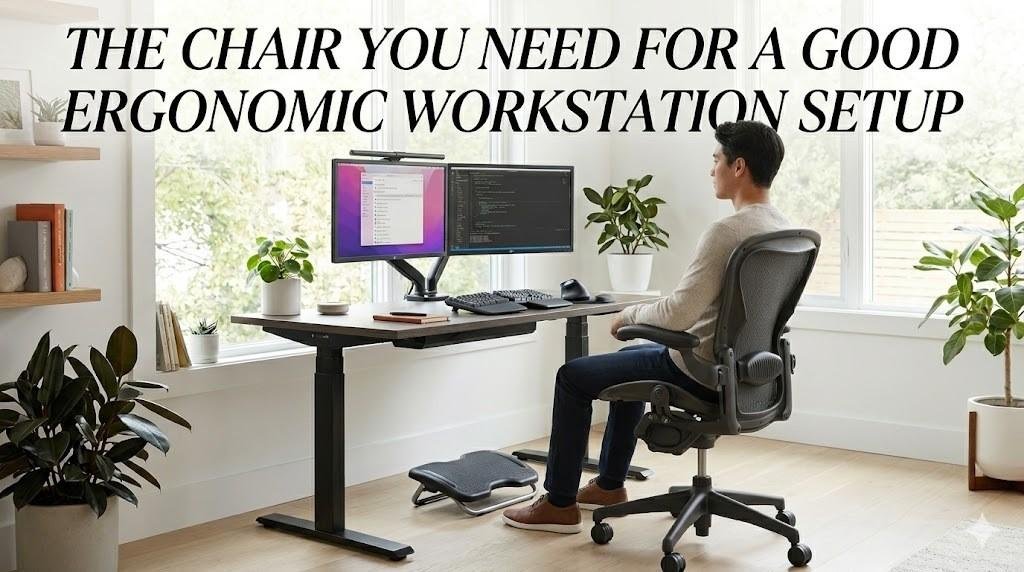
Ergonomics, in the context of a workstation, is about designing your workspace to fit your body, not the other way around. A properly ergonomic setup takes into account desk height, monitor position, keyboard and mouse placement, and critically, your chair. All of these elements work together. Adjust one and it affects the others.
Your chair is the foundation of all of it. It determines the height your hips sit at, which determines where your elbows naturally fall, which determines where your keyboard needs to be, which determines what angle your neck is at when looking at your monitor. Get the chair wrong, and the entire chain is off.
A desk at the right height is useless if the chair underneath it isn’t adjustable enough to properly position your body relative to it. Start with the chair. Always.
Why the Chair Is the Most Important Part of an Ergonomic Setup
I hear this a lot: “I got a standing desk, so my setup is ergonomic now.” Standing desks are genuinely useful, but most people with one still sit 70 to 80 percent of their workday. The chair still carries the load. A good ergonomic chair supports your spine’s natural curve, keeps the lumbar region from collapsing, positions the seat depth so you’re not losing back or thigh support, and lets your shoulders actually relax through properly adjusted armrests. Poor seating doesn’t announce itself. It shows up as a headache by mid-afternoon, shoulder tension after a few hours, and lower backache on the way home. By the time it’s noticeable, the pattern has usually been going on for a while.
Key Features of a Good Ergonomic Office Chair
Adjustable Lumbar Support
The lumbar spine has a natural inward curve (lordosis), and maintaining that curve while seated requires direct support. A chair without adjustable lumbar support either hits the wrong spot for your body or misses it entirely. The Classic Aeron used a lumbar pad that could be adjusted vertically, which was a genuine improvement over fixed-back chairs. The Remastered Aeron upgraded to PostureFit SL, a dual-pivot mechanism that independently supports both the sacrum and the lumbar, following the full lower-spine curve rather than just poking at one point in it.
For most users, the PostureFit SL is the more effective system, especially for longer sitting sessions. The lumbar pad on the Classic is still meaningfully better than what you get on most budget chairs, which is usually a fixed foam ridge that may or may not line up with your spine at all.
Seat Height and Depth Adjustments
The standard ergonomic recommendation is a 90–100 degree knee angle with feet flat on the floor. That sounds simple, but the range of human body proportions means no single fixed height works for everyone. Your chair needs to accommodate your specific leg length, and then your desk height needs to be set relative to where that puts your elbows.
Both the Classic and Remastered Aeron offer seat height adjustment via a pneumatic cylinder and seat depth adjustment via a sliding seat pan. These two features together allow most users to dial in a proper seated position regardless of their build, something that off-the-shelf budget chairs simply can’t.
Breathable Materials
Foam seating compresses and traps heat. After a few hours, you’re sitting in a warm, compacted cushion that’s lost much of its initial support. Mesh seating, particularly the 8Z Pellicle mesh used in both Aeron versions, solves both problems. The mesh maintains its shape and support across long sessions, and the open weave allows air circulation, which keeps you cooler and more comfortable.
The Remastered Aeron updated the tension mapping within the mesh: firmer zones under the thighs for load distribution and softer zones at the back to reduce pressure on the sitting bones. It’s a refinement you don’t necessarily notice until you sit in it for five or six hours straight, and then it becomes very apparent.
Adjustable Armrests
The goal of properly set armrests is to keep your shoulders in a neutral, relaxed position, not elevated or hunched forward. Both Aeron versions offer 4-way armrest adjustability: height, pivot, depth, and width. This range of adjustment allows you to position the arms so that your forearms rest supported while your elbows stay close to your torso and your wrists stay neutral at the keyboard.
On the Classic Aeron, this system is functional and well-designed. On the Remastered, the mechanism has been refined: the pivot motion is more precise, and the armpads themselves are more comfortable for extended contact. If you’re replacing arm pads on older Classic chairs (which I do regularly), the Remastered-spec pads are a noticeable improvement.
Tilt Mechanism and Recline Support
Dynamic sitting, meaning slight postural shifts throughout the day, is better for your body than staying locked in a single position, however ergonomically correct that position might be. A good tilt mechanism supports that natural movement without letting you slump.
The Classic Aeron uses a tilt limiter with adjustable tension: solid, reliable, and functional for most users. The Remastered adds a forward tilt option, which is genuinely useful for keyboard-intensive work: tilting the seat pan slightly forward opens the hip angle, reduces thigh compression, and makes it easier to keep the lumbar curve intact while leaning toward the desk.
Why the Herman Miller Aeron Chair Is Ideal for Ergonomic Workstations
I’m not going to pretend I’m a neutral party here. I’ve dedicated my career to these chairs. But I’ve also worked on enough of them to know exactly why they hold up the way they do.
The Aeron’s reputation in the ergonomic chair market isn’t just brand prestige. It’s built on engineering decisions that were genuinely ahead of their time when the Classic launched in 1994 and that the Remastered refined intelligently in 2017. Here’s what separates both versions from most of what else is on the market:
- Posture support: The combination of lumbar or PostureFit SL support, adjustable seat depth, and a seat pan that tilts and adjusts means the chair actively supports your posture rather than just giving you something to lean on.
- Mesh design: The 8Z Pellicle mesh is not the same thing as the cheap mesh you find on budget chairs. It’s engineered with zone-specific tension, and it doesn’t flatten out over time the way foam does.
- Adjustability: Most ergonomic chairs offer height adjustment and maybe lumbar. The Aeron (both versions) offers height, seat depth, lumbar support, armrests (4-way), tilt tension, and tilt lock. That’s a level of fit customization that most chairs simply don’t provide.
- Durability and longevity: I’ve refurbished Classic Aerons that are over 20 years old and still have excellent bones. The frame, the tilt mechanism, and the cylinder housing—all of it was built to last. That matters both for the environment and for your total cost of ownership.
The refurbished market makes both versions accessible at a price point that most buyers can work with. A professionally refurbished Classic Aeron in the $400–$700 range is a dramatically better ergonomic investment than a $300 budget chair from a big-box retailer, not because of the brand but because of the underlying engineering.
How the Aeron Compares: Ergonomic Feature Breakdown
| Ergonomic Feature | Classic Aeron | Remastered Aeron | Typical Budget Chair |
|---|---|---|---|
| Lumbar Support | Adjustable lumbar pad | PostureFit SL (sacral + lumbar) | Fixed foam pad or none |
| Seat Depth Adjust | Yes | Yes (refined) | Rarely |
| Breathable Mesh | 8Z Pellicle mesh | 8Z Pellicle (updated zones) | Often foam or thin fabric |
| Armrest Adjustability | 4-way | 4-way (refined) | 1–2 ways at best |
| Tilt / Recline | Tilt limiter + tension | Forward tilt + smooth recline | Basic or none |
| Spinal Alignment | Strong | Excellent | Poor to moderate |
| Durability | 20+ years (refurbishable) | 20+ years (refurbishable) | 3–5 years typical |
| Refurbished Price Range | ~$400–$700 | ~$600–$900 | N/A (not worth refurbing) |
For a deeper dive into how these two models compare beyond this quick breakdown, see our full Aeron Remastered vs. Classic guide.
Refurbished Ergonomic Chairs: Premium Comfort at a Lower Price
One of the questions I get most often is some version of “Is a refurbished Aeron as good as a new one?” The answer depends entirely on who refurbished it and what they actually did to it.
A properly refurbished Aeron performs like a new chair. The Aeron was designed with serviceability in mind. Cylinders, casters, arm pads, lumbar components, and mesh are all replaceable. That’s part of what makes it worth refurbishing in the first place.
Here’s what a professional refurbishment should deliver:
- Cost savings. Typically 40 to 60 percent off retail. A Remastered Aeron that runs $1,500 to $1,900 new, can be found in excellent refurbished condition for $600 to $900.
- Restored components. Any reputable refurbisher replaces the parts that wear: cylinders, arm pads, and casters, at a minimum. If the seat mesh shows sag or thin spots, that gets replaced too. Tilt mechanisms and adjustment hardware are cleaned and inspected.
- Sustainability. Refurbishing a chair instead of building a new one means fewer raw materials, less energy, and less waste. For businesses outfitting teams, that adds up.
- Warranty. At Nulife Chairs, we back every refurbished chair we sell. If it leaves our shop, we stand behind it.
For businesses equipping remote teams or outfitting office spaces, refurbished Aerons offer a compelling proposition: documented ergonomic quality at a price that scales. The U.S. General Services Administration’s ergonomics guidance emphasizes that investing in proper seating reduces workplace injury costs, which makes the economics of a refurbished premium chair even more straightforward.
How to Set Up Your Ergonomic Workstation (Step-by-Step)
Once you have the right chair, setting up the rest of your workstation is a matter of working through the chain from the ground up.
Step 1: Adjust Chair Height Feet flat on the floor, knees at 90 to 100 degrees. Use a footrest if needed. Adjust the lever while seated.
Step 2: Set Seat Depth Two to three fingers of clearance between the back of your knees and the seat edge. Too much pressure restricts circulation. Too little, and your lower back takes on extra load.
Step 3: Dial In Lumbar Support On the Classic, position the lumbar pad at the hollow just above the beltline. On the Remastered, adjust both PostureFit SL pads to follow your spine’s natural curve. You should feel supported without being pushed forward.
Step 4: Set Desk and Keyboard Height. Forearms parallel to the floor, wrists neutral, elbows close to your torso at roughly 90 degrees.
Step 5: Place the monitor at eye level. Top of screen at or just below eye level, 20 to 30 inches out. A monitor arm gives you more flexibility than a fixed stand.
Step 6: Adjust armrests. Shoulders level and relaxed, forearms supported, and elbows tucked close to your body.
Step 7: Keep Moving. The setup does most of the work, but no ergonomic configuration eliminates the need for movement. Shift position or stand briefly every 45 to 60 minutes. NIOSH recommends regular micro-breaks as part of any ergonomic workstation program.
Choosing the Right Ergonomic Chair for Your Office or Home Workspace
Not every Aeron is right for every person. Here’s how I’d think through the decision:
- Body type: Get the size right first. The Aeron comes in A (small), B (medium), and C (large). Sitting in the wrong size undermines every other feature. Size B fits most users between 5’3″ and 6’0″; size C is for taller or broader builds. If you’re unsure, err toward the smaller size and check the seat depth. It’s more fixable than a seat that’s too wide.
- Hours of use: If you’re sitting 6–8 hours daily, the Remastered’s PostureFit SL is worth the additional cost. For 4–5 hour sessions, the Classic Aeron’s lumbar pad is genuinely effective and the savings are meaningful. Both are dramatically better than any budget alternative for extended use.
- Budget: Refurbished Classic Aerons run $400–$700; refurbished Remastered Aerons typically run $600–$900. Both represent strong value for what you’re getting. If you’re outfitting a team, the per-unit savings on refurbished chairs add up to a meaningful budget difference.
- Adjustability needs: Both versions offer excellent adjustability. If you have specific requirements like forward tilt for keyboard work or PostureFit SL for back support issues, the Remastered has the edge. For general use, the Classic is more than adequate.
- Durability: Both versions last decades when properly maintained. A refurbished Aeron from a reputable source will outlast any budget chair bought new.
Conclusion
A good ergonomic workstation setup is a system (monitor height, desk surface, and keyboard placement), but the chair is the foundation every other element is built upon. Get that part right, and the rest of the setup falls into place much more naturally. Get it wrong and no amount of desk adjustment will fully compensate.
The Herman Miller Aeron, in either its Classic or Remastered form, represents the kind of ergonomic engineering that genuinely makes a difference across a long workday. The Classic delivers strong spinal support and full adjustability at a lower refurbished price point. The Remastered adds PostureFit SL and a refined tilt system that benefits anyone spending serious hours at their desk.
Neither requires a full retail budget. A professionally refurbished Aeron, inspected, serviced, and backed with a warranty, gives you the same ergonomic performance at 40–60% of the cost of buying new. For anyone serious about building a workspace that supports their body for the long term, that’s a straightforward decision.
Frequently Asked Questions
Looking to upgrade your workstation without paying full price for premium seating?
Contact us today to build a healthier, more comfortable workspace.